Record what happened
Log the exercises, reps, and weights you actually completed. A plan is useful before a session; an accurate record is useful after it.
Explore workout loggingSTRENGTH PROGRESS TRACKER FOR IPHONE
You remember your last workout. Your log remembers the ones before it. Follow your recorded lifts and weekly training volume in Gymr, then look back at the sessions behind each change.

Advanced trends with Gymr Pro. See current plans in the app.
BUILD A RECORD YOU CAN RETURN TO
Log the exercises, reps, and weights you actually completed. A plan is useful before a session; an accurate record is useful after it.
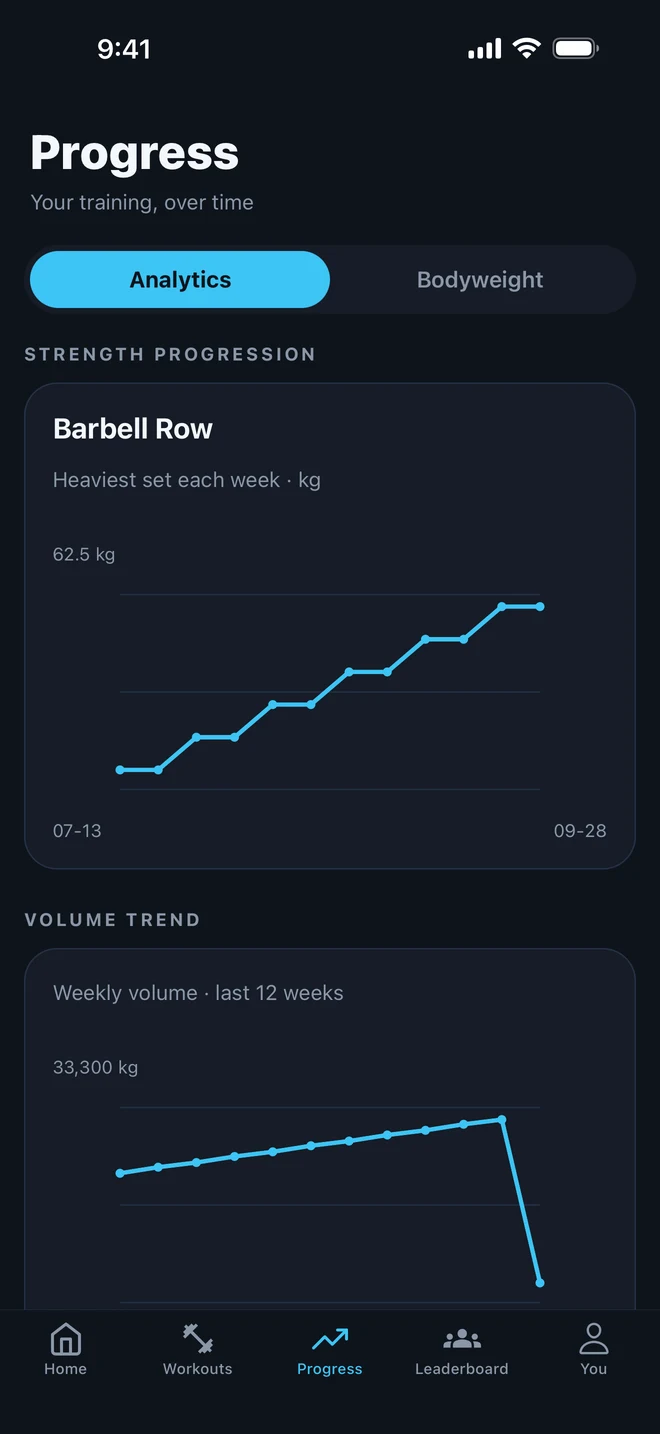
Explore workout loggingSee the weekly heaviest set for the exercise displayed in your chart. Keep the exercise and setup consistent so the history is easier to compare.
Use your workout history alongside the charts. Reps, recorded weight, and weekly volume answer different questions about the work you logged.
TWO VIEWS OF THE SAME WORK
Imagine logging the same exercise on the same equipment. In one session, you record 40 kg for 10 reps. Next time, you record 45 kg for 8 reps.
The second set uses more weight, but its recorded volume is lower: 360 kg compared with 400 kg. Both numbers can be correct. Neither number alone describes the whole session.
Gymr’s weekly strength chart shows recorded weight. The volume chart adds weight × reps across eligible logged sets. Review both with the workout details in mind.
| Session | Set | Volume |
|---|---|---|
| Earlier | 40 kg × 10 | 400 kg |
| Later | 45 kg × 8 | 360 kg |
Illustrative log entries, not a strength score or a prescribed workout.
GIVE THE NUMBERS SOME CONTEXT
A current week is still in progress. A different machine may mean a different setup. A missing workout means missing data. Start with those details when something in your chart looks unexpected.
Keep logging the sessions you finish, and return to a routine you can recognize from week to week.
Build a reusable workout planUse consistent exercise names, record your reps as well as your weights, and check your units. These simple habits give you a more useful record to look back on.
Read the workout-log guideUNDERSTAND YOUR WORKOUT HISTORY
The weekly strength line needs eligible weighted sets for the displayed exercise in at least two different weeks. A saved routine or a scheduled session does not add completed sets. Check that you recorded both the weight and reps for the workouts you finished.
Gymr uses the weighted exercise recorded in the most completed sessions. Each point shows its heaviest recorded set for that week. Check the exercise name above the chart before comparing the numbers.
The chart plots weight, not an estimate adjusted for reps. A heavier set with fewer reps is a different result from the same reps with more weight. Review the underlying workout log to understand the change.
The total depends on the weighted sets you logged: weight multiplied by reps, added together. Fewer logged sets, different exercises, or a week that is still in progress can change the total. It does not tell you the reason by itself.
No. This page explains recorded weights and training volume. The Strength Profile is a separate view; use its in-app explanation for how its score or tier is calculated.
Advanced trends are part of Gymr Pro in the current app. Check the in-app upgrade screen and App Store listing for current pricing, subscriptions, and included features.
START WITH YOUR NEXT SESSION
Keep your workouts in one place and explore your training history with Gymr for iPhone.